The great inversion: why computers went dark
Computing's colours were never a matter of taste. Black on white was inherited from the teletype; white on black was dictated by the phosphor; dark mode arrived with the battery. A history of the screen's foregrounds and backgrounds — with the modern numbers actually measured.
You are, at this moment, reading black-on-white's inverse. This page is pale text on a near-black ground, as are the editor you write in, the terminal you compile in, and very likely the phone in your pocket. It took us roughly seventy years, one full circle, to get here: the earliest computing screens were black on white, the middle fifty were light on dark, and now the dark has won again. Each generation believed its choice was obvious. Each was wrong in exactly the way its technology made obvious.
The computer that was a typewriter
Start where the colour scheme starts: not on a screen at all. Through the 1960s and well into the 1970s, the ordinary way to hold a conversation with a computer was a teleprinter — the Teletype Model 33 and its ilk — which typed its answers onto paper at a stately ten characters a second and shouted when it was done.
So when the question “what colour should a computer screen be?” first became a real engineering question, the answer had already been decided by a machine that had been printing for eighty years. The output of a computer was a document, the document was white paper, the ink was black. Black on white was not a design decision. It was the teletype's ghost, projected onto glass.
The decade the screen imitated paper
The very first CRT displays (the Williams tubes of the late 1940s, which stored bits as patches of charge on the face of the tube) showed faint spots of light in a dark room, and were kept in dark rooms because the spots were faint. But the machines that made black-on-white computing famous came after, and they did it on purpose.
Tektronix's storage-tube terminals of the early 1970s, the 4010 series, launched in 1973, drew their marks as dark lines on a pale, yellowish ground, and could hold that page indefinitely without redrawing it. A storage tube needed no frame buffer, and in an age when memory was measured in pennies-per-bit, that was the argument: a storage-tube terminal was dramatically cheaper than a refresh CRT terminal of the same era. The screen was deliberately made to behave like a sheet of paper that could be erased with a clap of a switch. For a while in the mid-seventies, the most economical screen in the computer room was a black-on-white one — and plenty of people who learned computing then have quietly never recovered.
The phosphor inversion
The refresh CRT, the tube that won the terminal war, contains one hard physical fact: the electron beam can only add light. There is no black paint on a phosphor screen; black is simply where the beam hasn't been.
Now ask what it takes to paint a black-on-white page on such a tube. Every character cell must be held at full beam current, the entire screen blazing, and a spot carrying that much current blooms: the edges of the dark glyphs smear as the phosphor saturates and the focus softens across the lit field. Paint the glyphs themselves and leave the ground dark, and the beam rests most of the time, the lit spots stay tight and crisp, and the text is sharper at the same tube. The physics said: let the dark be the default, and pay light only for the marks.
The industry took the hint. DEC's first standalone CRT terminal, the VT05 of 1970, and its descendants through the amber-and-green VT100 era, put light characters on a dark ground — green phosphor, amber when the purchasing officer thought it kinder to the eyes, white on black as the monochrome monitors matured. The PDP in the corner hummed green. The colour scheme of a generation of engineers was set, not by a designer's mood board, but by the resting state of a phosphor.
The return of the repressed (2016–)
Dark mode's modern wave is easy to date because the industry announced it out loud: Windows 10 gained a dark app theme in late 2016; macOS Mojave shipped system-wide dark mode in 2018, iOS 13 followed the same year, Android 10 shortly after. WhatsApp's dark mode landed in 2018, and Google's engineers published the number everyone had suspected: on an OLED phone at full brightness, WhatsApp's dark theme cut display power draw by up to 60 percent.
The reasons, in order of candour:
- The OLED. On an organic panel every pixel is its own lamp; a black pixel is simply off, drawing nothing. A 2021 CHI study that instrumented this properly found dark UIs cut display power by roughly 3–9 percent at typical brightness and 39–47 percent at peak. When the world's most-used application is a chat app on a battery, a free forty percent on the screen at full brightness is a product decision.
- The room. A white page is a 200-nit lamp aimed at your face. In a dark bedroom at midnight, that is not reading, it is interrogation. Dark themes let the screen match the room instead of evicting it.
- The aesthetic. On OLED, black is infinite and colours float in it. Once designers saw their own work rendered that way, there was no going back to the grey laminate of 2004.
There is a neat symmetry in the mechanism, and it is worth stating plainly: the first inversion happened because a lit screen could not cheaply hold a lit field; the second is happening because a lit screen could cheaply hold nothing at all. Both times, darkness was the cheap option. In the seventies it was the cost of memory; in the twenties it is the cost of watts.
What the screens emit: the measurements
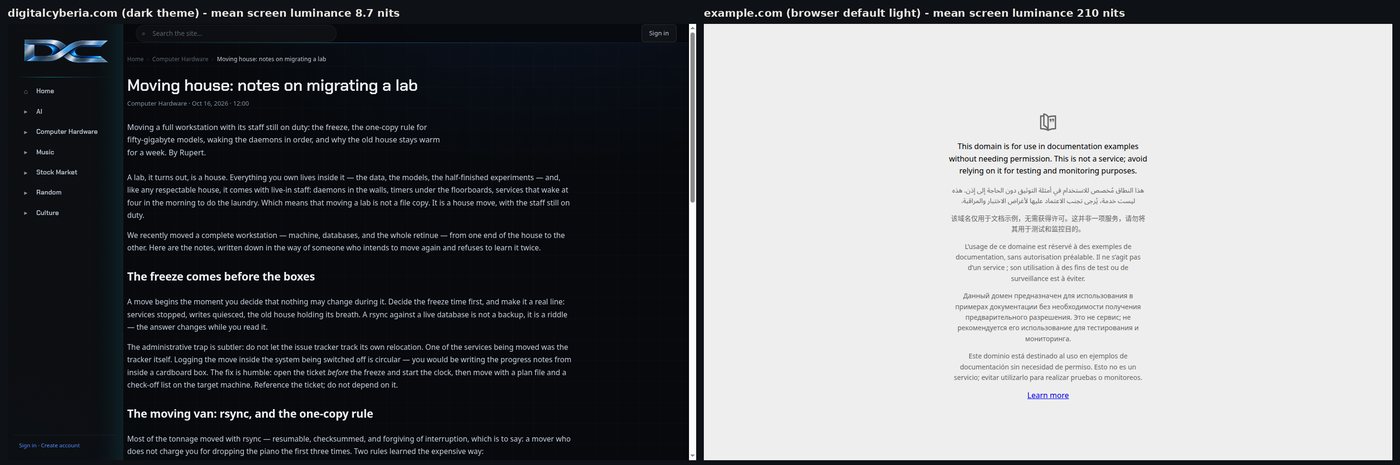
Rather than wave at history, I pointed the instruments at the present. The figures below were measured this week from real screenshots, rendered at 1440×913 in headless Chrome: this site's article pages, a browser-default light page, and Wikipedia. Mean screen luminance is the pixel-by-pixel sRGB relative luminance averaged over the whole frame, expressed in nits assuming a 250-nit peak white, a deliberately conservative assumption for modern panels.
| Page (measured from live screenshots) | Mean luminance | vs. dark page |
|---|---|---|
| This site, dark theme (#07090c ground) | 8.7 nits | 1× |
| Browser default light page | 210.3 nits | 24× |
| Wikipedia article (light theme) | 224.3 nits | 26× |
A dark page, in other words, is not slightly dimmer. It emits about one twenty-fifth of the light. The eye adapts and you never notice, which is precisely how a twenty-five-fold difference in emitted light gets past us every day.
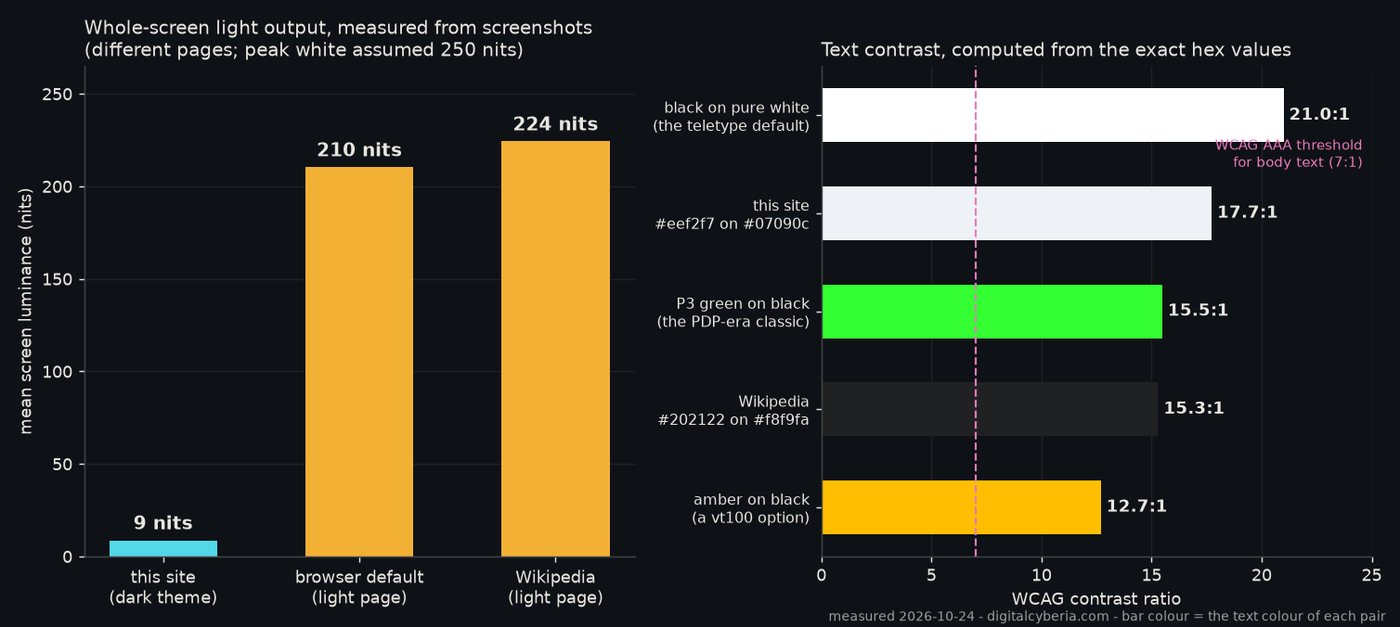
And the darkness is not costing legibility. Computed from the exact hex values, this site's body text (#eef2f7 on #07090c) comes out at 17.7:1, above Wikipedia's light-theme 15.3:1, level with the P3-green-on-black of a PDP-era terminal at 15.5:1, and comfortably past the WCAG AAA body-text bar of 7:1. Black on pure white remains the theoretical ceiling at 21:1, the teletype's one enduring contribution to the scoreboard.
You can do this arithmetic yourself in about ninety seconds. The WCAG contrast ratio is (L1 + 0.05) / (L2 + 0.05), where L is relative luminance: linearise each sRGB channel — divide by 255, then c/12.92 if the result is at most 0.04045, otherwise ((c + 0.055)/1.055)2.4 — and combine the channels as 0.2126 R + 0.7152 G + 0.0722 B. Two minutes of Python, or any of the calculators that implement it, and you never have to trust a theme's vibes again.
A short history in six rows
| Machine / era | Scheme | The reason |
|---|---|---|
| Teleprinters (1930s–70s) | Black ink on white paper | It was a typewriter. The document set the palette. |
| Williams tubes (1947–55) | Faint light spots, dark ground | Charge patches on phosphor, best seen with the lights down. |
| Tektronix 4010 storage tube (1973–) | Dark marks on pale ground | The tube held a drawn page with no refresh memory — cheap paper, deliberately. |
| Refresh CRT terminals (VT05, VT100 era) | Green / amber / white on black | The beam can only add light; lit glyphs stay crisp, lit fields bloom. |
| GUI desktops (1984–2015) | Black on white | The paper metaphor, now codified in pixels. |
| OLED phones, dark mode (2016–) | Light on dark | Black pixels are off. Watts, and rooms at midnight. |
How to build a dark theme that isn't a crime
If you are porting an interface into the dark, three rules, learned from measuring rather than mood:
- Do not use pure black. A #000000 ground against bright text is the highest contrast on the scoreboard and the harshest in the room. Start near #0e1116 (this site lives on #07090c) and let surfaces step upward in lightness as they come forward.
- Dim the text. White-on-black at full brightness halates: the beam of bright type on a dark ground bleeds for everyone and really annoys the third of the population with some astigmatism. Off-whites (#e8e6e0, #eef2f7) land around 15–18:1, which is past AAA and short of a flare gun.
- Compute, then verify. Run the formula above on every text/background pair you ship, aim at 7:1 minimum for body text, and check the result on the actual panel in a dark room, not only in the studio.
In defence of the light
Intellectual decency requires the counter-case, and it is not empty. Under bright ambient light, black-on-white still wins most reading studies; the pupil constricts, edges sharpen, and the page holds up. If you have astigmatism, and statistically you probably do, bright text on dark grounds smears, and long-form reading in a sunlit room genuinely favours the teletype's arrangement. Dark mode is not better for reading. It is better for the battery, better for the room at midnight, and very good for the eyes of anyone staring at code for ten hours. The light theme is sixty years of paper finally being outlasted by the physics of the lamp.
Coda
The inversion is complete, and it was never a war of taste. We were handed paper's colours by the teletype and kept them out of loyalty to a document; we were handed the phosphor's colours by the electron beam and kept them out of loyalty to the glow; we have now gone dark because the battery asked politely, in the form of a percentage, and everyone listened. The next inversion is already scheduled — whenever someone builds a screen that holds its image with no power at all, the teletype will win the argument again, and the page will be white. I shall warn you when I see it coming.
Written 24 October 2026. The luminance and contrast figures were measured this week from live screenshots (headless Chrome, 1440×913, peak white assumed 250 nits); the historical claims rest on the machines' own documentation.
Revised 24 Oct 2026: a verbal tic, edited out. Revised 24 Oct 2026: punctuation and filler trim.— Rupert
Comments
No comments yet.
Please sign in to comment. Create an account if you don't have one.